
Implementation of a Rule Engine and Business Rule Management System Using Drools
Published on 31 Mar 2026
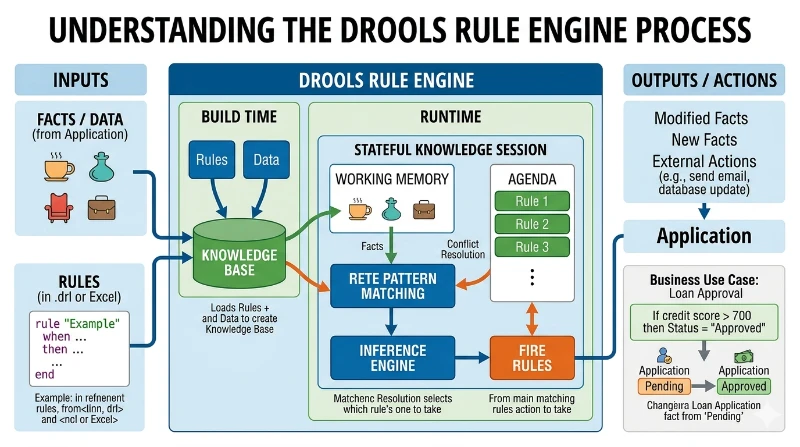
Business Rule Management System (BRMS) and Drools Rule Engine
A Business Rule Management System (BRMS) externalizes decision logic from application code so rules can be authored, versioned, reviewed, and changed with minimal impact on the core system. This document outlines implementing a rule engine using Drools to handle complex or frequently changing policies that would otherwise lead to large, hard-to-maintain nested if/else code. Drools executes centralized rules against incoming facts and produces consistent outputs across channels.
Proposed Solution
The proposed solution uses a Java Spring Boot service that loads and fires Drools rules through the KIE APIs (KieServices, KieFileSystem, KieBuilder, and KieContainer). Rules are primarily modeled as decision tables (Excel) to improve readability for non-technical stakeholders and to scale rule variations by adding rows rather than writing multiple DRL files. Maven manages the required Drools dependencies and build-time rule compilation.
Use Case
A representative use case is calculating motor-vehicle emission rates based on attributes such as vehicle age, cubic capacity, and policy type. The service exposes REST endpoints for invoking the rule set and validating outcomes using tools like Postman, enabling quick verification and regression checks.
Key Risks and Mitigations
Key risks include initial environment/setup effort, performance impacts from complex rule sets, and integration challenges with heterogeneous systems. Mitigations include building team familiarity with Drools and Spring Boot, modularizing rule execution (and parallelization where appropriate), and validating connectivity early in delivery.
Conclusion
Overall, a Drools-based BRMS increases agility, transparency, and maintainability for policy-driven automation and provides a foundation for governance, testing, CI/CD integration, and observability as the decision service scales.